
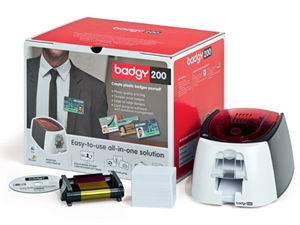
Plastic card printers have become essential tools for businesses, schools, healthcare facilities, and government organizations. From employee ID badges to membership cards and secure access credentials, having an in-house card printing solution saves time, increases security, and gives you full control over your card issuance process.
If you’re considering investing in a plastic card printer, here’s what you need to know before making a decision.
________________________________________
Why Print Cards In-House?
Outsourcing card production can create delays, higher long-term costs, and security risks. An in-house plastic card printer allows you to:
• Instantly issue employee ID badges
• Replace lost or damaged cards immediately
• Control sensitive data securely
• Customize designs whenever needed
• Reduce per-card production costs over time
For organizations with ongoing card needs, owning a printer quickly pays for itself.
________________________________________
Types of Plastic Card Printers
Not all card printers are built the same. Choosing the right one depends on your volume, security requirements, and budget.
1. Single-Sided Card Printers
Ideal for small to mid-sized organizations printing basic ID cards with photos and text. These printers print on one side of the card at a time and are typically the most affordable option.
2. Dual-Sided Card Printers
Perfect for businesses that need more space for barcodes, disclaimers, or branding. Dual-sided printers automatically print both sides in a single pass, saving time and increasing efficiency.
3. Direct-to-Card (DTC) Printers
DTC printers apply color directly to the card surface. They are ideal for standard PVC cards and are widely used for everyday ID printing.
4. Retransfer Card Printers
Retransfer printers print the image onto a clear film that is then bonded to the card surface. This produces high-definition, edge-to-edge printing and is ideal for smart cards and high-security credentials.
________________________________________
Key Features to Consider
When comparing models, look for:
• Print resolution (300 dpi is standard)
• Print speed
• Connectivity options (USB, Ethernet, Wi-Fi)
• Encoding capabilities (magstripe, smart card, RFID)
• Upgradeability (dual-sided modules, lamination modules)
Choosing a scalable printer ensures your investment grows with your organization.
________________________________________
Essential Plastic Card Printer Accessories
Your printer is only part of the solution. Accessories improve efficiency, durability, and security.
Printer Ribbons
Color ribbons (YMCKO) for full-color printing, monochrome ribbons for simple text, and specialty ribbons for security features.
Cleaning Kits
Routine cleaning prevents printhead damage and maintains consistent print quality. Most manufacturers recommend cleaning after every ribbon change.
Blank PVC Cards
Available in standard white, colored, composite, or specialty materials depending on durability and encoding needs.
Lamination Modules
Laminates add a protective overlay to increase card lifespan and prevent tampering.
________________________________________
Why Buy from PlasticCardID.com?
When investing in a plastic card printer, expertise matters. PlasticCardID.com provides:
• Trusted brand-name printers
• Genuine manufacturer supplies
• Technical support
• Upgrade options
• Competitive pricing
Whether you need a basic badge printer or a high-security retransfer system, having expert guidance ensures you choose the right equipment the first time.
________________________________________
Printer Thoughts
A plastic card printer is more than a machine — it’s a long-term asset that improves security, efficiency, and professionalism. By understanding your needs and investing in the right accessories, you can build a reliable in-house ID printing system that supports your organization for years to come.


Leave A Comment